 Official APK & app
Download the RoyalJeet APK for Android
The RoyalJeet Android app is installed from an APK file downloaded from this page. It takes four steps: download the file, allow your browser to install it, install, and log in. The app uses the same account and balance as the website.
Download the RoyalJeet APK
- App
- RoyalJeet for Android
- File type
- APK (.apk)
- Price
- Free
- Published at
- royaljeetapk.com
- Version
- 2.4
- File size
- Approx. 43 MB
- Requires
- Android 5.1 or later

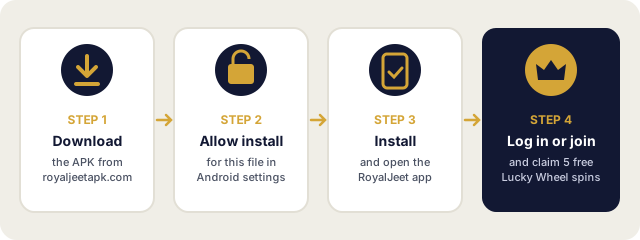
How to Install the RoyalJeet APK
- Tap Download APK above and wait for the download to finish.
- Open the downloaded file from your notifications or your Downloads folder.
- If Android asks, allow your browser to install apps (see the settings below), then go back.
- Tap Install , then Open .
- Log in, or tap Join Now to create an account .
Allowing the Installation
Android only installs APK files from apps you have allowed. The permission is given to the app that opens the file, usually your browser, not to RoyalJeet.
| Android version | Where to allow it |
|---|---|
| Android 8.0 and newer | When prompted, tap Settings and switch on Allow from this source for your browser. You can also find it under Settings › Apps › Special app access › Install unknown apps. |
| Android 5.1 to 7.1 | Settings › Security › switch on Unknown sources . |
After the app is installed you can switch the permission off again. It is only needed when you install or update.
If the Installation Does Not Work
| Message or problem | What to do |
|---|---|
| “App not installed” | Free up storage space and try again. If an older RoyalJeet app is installed from another source, uninstall it first. |
| “There was a problem parsing the package” | The download was incomplete or the file is damaged. Delete it and download it again from this page. |
| Nothing happens when you tap the file | Open it from your browser’s Downloads list or the Files app, and check the install permission above. |
| Google Play Protect shows a warning | Check that the file came from royaljeetapk.com. If the warning says the app is harmful, do not install it and contact RoyalJeet support . |
Updating the App
To update, download the latest APK from this page and install it over the existing app. Your account and settings stay as they are. More about versions and signatures on the RoyalJeet APK page .
iPhone and iPad
APK files only work on Android. On iPhone or iPad, open RoyalJeet in Safari and use Share › Add to Home Screen for one-tap access to the same account.
Only download from royaljeetapk.com. APK files offered through ads, messaging apps or other download sites may be modified. RoyalJeet does not send the app by WhatsApp or Telegram.
18+ only. Play responsibly. Set a budget before you play, take regular breaks and never chase losses. Responsible gambling tools and help .
Frequently Asked Questions
How do I download the RoyalJeet APK?
Tap Download APK on royaljeetapk.com/download/ (version 2.4, about 43 MB), open the file when the download finishes, allow your browser to install it if asked, then tap Install.
Will the app work on my phone?
The RoyalJeet app needs Android 5.1 or later and about 43 MB for the download, plus free space to install it.
Why does Android ask for permission to install the app?
Android only installs APK files from apps you have allowed, such as your browser. You can switch the permission off again after installing.
What should I do if I see "App not installed"?
Free up storage space and try again. If an older copy of the app is installed from another source, uninstall it first.
Is there a RoyalJeet app for iPhone?
APK files only work on Android. On iPhone, open RoyalJeet in Safari and add it to your home screen.
How do I update the RoyalJeet app?
Download the latest APK from this page and install it over the existing app. Your account stays the same.